Posts

payUmoney Payment Gateway Integration in iOS App (Objective C)
Image
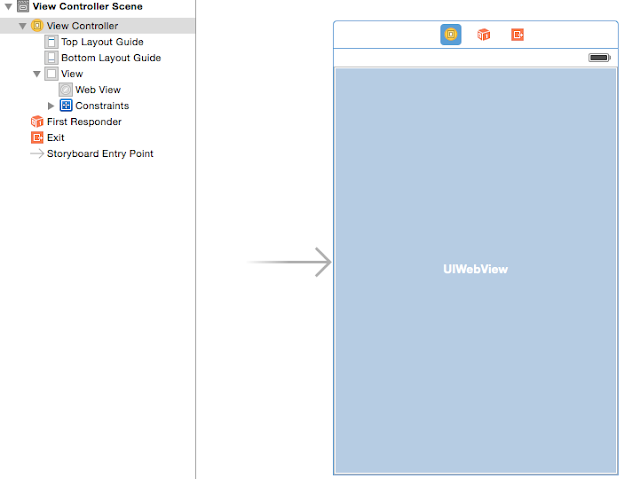
We have many Payment Gateways available such as Paypal , CCAvenue , Zaakpay , etc. payUmoney is the best Payment Gateway available in India now; according to me. I am saying this with my personal experience with  payUmoney  Technical Support Team. They offer 2.9% Transaction charges without any Enrolment, Setup, AMC or other Hidden charges. payUmoney Home Page Link:  Home_Page payUmoney Contact Details:  Address:   5th Floor, Pearl Towers Plot 51, Sector 32 Gurgaon, 122002  Phone:   0124-6624956,  0124-6624970  Email:   techsupport@payumoney.com Steps to integrate payUmoney gateway: 1. Create a new iOS Objective C app in XCode. 2. Open Main.storyboard in you app. 3. Add UIWebView and set its Delegate. [Screenshot 1] 4. Set Frames & Constraints as per design requirements. 5. Link UIWebView by creating IBOutlet to either .h or .m file. [Screenshot 2] 6. Signup ...

Variable declaration in Swift

Declaration of iVar: Let's start with declaring iVars in Swift In Swift we can declare an iVar using keyword: 1. let - it declares an immutable iVar 2. var - it declares a mutable iVar let myLetObject = "My immutable iVar" So now i cannot change the value of myLetObject after it is once assigned. var myVarObject = "My mutable iVar" myVarObject = "Changed the value of iVar" I can change its value at any instance. Some examples of declaring objects: let luckyNumber = 9 let  myAge = NSInteger (27 ) var myHeight = 5.5 let myImage = UIIMage(named:"MyPhoto.png") var myName: NSString = NSString"string:Suraj Ramjan Mirajkar" var tableView: UITableView !

Youtube Video Player

To play Youtube video within the app we have 2 ways: 1. Open Youtube App (if installed) or launch Safari to play video: [[ UIApplication sharedApplication ] openURL :[ NSURL URLWithString : @"http://www.youtube.com/watch?v=Xk1zfQOklJY" ]]; In this case we don't have a choice to bring back the user to our app. So we better use the 2nd way. 2. Embed Youtube iOS Player Helper: I have used  youtube-ios-player-helper  Version -  0.1.3 Select  YTPlayerView.h ,  YTPlayerView.m , and the  Assets  folder from my Github repository  CODE . Drag these files and folders into your project. Make sure the  Copy items into destination group’s folder  option is checked. When dragging the Assets folder, make sure that the  Create Folder References for any added folders  option is checked. Drag a UIView the desired size of your player onto your Storyboard. Change the UIView's class in the Identity Inspector tab to Y...

Check Internet Connectivity Using AFNetworking 2.0

I have created  NetworkRechabilityMonitor class to get the Internet Connection status in my app using AFNetworking 2.0 library. 1. Create an NSObject class naming  NetworkRechabilityMonitor , add below code in respective Header & Implementation files.   NetworkRechabilityMonitor.h #import <Foundation/Foundation.h> @interface NetworkRechabilityMonitor : NSObject +( void )startNetworkReachabilityMonitoring; +( BOOL )checkNetworkStatus; @end NetworkRechabilityMonitor.m #import "NetworkRechabilityMonitor.h" @implementation NetworkRechabilityMonitor #pragma mark - Start Monitoring Network Manager +( void )startNetworkReachabilityMonitoring {     [[ AFNetworkReachabilityManager sharedManager ] startMonitoring ]; } #pragma mark - Check Internet Network Status +( BOOL )checkNetworkStatus {     return [ AFNetworkReachabilityManager sharedManager ]. reachable ; } ...

iOS 6 Grouped Style UITableView in iOS 8 App

I came across a requirement where i have to show  iOS 6 grouped style UITableView in iOS8 App. So i did some workaround and it really works. Steps: I added a UITableView on UIViewController (Scene) in UIStoryboard. I reduced the width of the UITableView and centre aligned it (eg. UIViewController width - 320px so i take 300px UITableView). Add & Import QuartzCore framework. In cellForRowAtIndexPath method make the cell layer corner round as per requirement and set masktobounds as shown below. - ( UITableViewCell *)tableView:( UITableView *)tableView cellForRowAtIndexPath:( NSIndexPath *)indexPath {     static NSString *CellIdentifier = @"TableCell" ;          UITableViewCell *tableCell = [tableView dequeueReusableCellWithIdentifier :CellIdentifier];     if (tableCell == nil ) {         tableCell = [[ UITableViewCell alloc ] initWithStyle : UITableViewCel...

Text to Speech in iOS7

iOS7 makes Text to Speech really easy and that also in multiple languages. iOS7 has added two new classes for Text to Speech functionality: 1. AVSpeechSynthesizer 2. AVSpeechUtterance First Link AVFoundation and AudioToolbox Framework from Application Target -> Build Phases -> Link Binary With Libraries. Import both frameworks in Header file (.h file) #import <AVFoundation/AVFoundation.h> #import <AudioToolbox/AudioToolbox.h> add delegate <AVSpeechSynthesizerDelegate> . In implementation file (.m file)     AVSpeechSynthesizer *speechSynthesizer = [[AVSpeechSynthesizer alloc] init];     AVSpeechUtterance *speechUtterance = [AVSpeechUtterance speechUtteranceWithString:@"Welcome to iOS App."];      speechUtterance .rate = AVSpeechUtteranceMaximumSpeechRate / 4.0f;      speechUtterance .voice = [AVSpeechSynthesisVoice voiceWithLanguage:@"en-US"]; // language     [ speechSynthesi...

Display HTML in NSAttributedString in iOS7

iOS7 has really added some best things like displaying HTML in NSAttributedString. Suppose in a case you want to display some HTML in your UITextView from any website. Just pass the HTML to NSAttributedString and set this attributed string to the UITextView and that's it, you are done. In below snippet i have passed the html string from my blog site to NSAttributedString and this NSAttributedString is set to UITextView. Now the html from my blog site will be displayed in the UITextView along with clickable links.       NSString *strHtml = [NSString stringWithContentsOfURL:[NSURL   URLWithString:@"http://objectivecwithsuraj.blogspot.in/"] encoding:NSUTF8StringEncoding error:nil];          NSAttributedString *attrStrWithHtml = [[NSAttributedString alloc]                     initWithData:[strHtml dataUsingEncoding:NSUTF8StringEncoding]          ...